Skip to main content
Statistics for Business
My Course
Learn
Exam Prep
AI Tutor
Study Guides
Flashcards
Explore
Try the app
My Course
Learn
Exam Prep
AI Tutor
Study Guides
Flashcards
Explore
Try the app
Back
Finding Poisson Probabilities-Excel quiz
You can tap to flip the card.
What is the purpose of the =POISSON.DIST function in Excel?
You can tap to flip the card.
👆
What is the purpose of the =POISSON.DIST function in Excel?
It is used to calculate Poisson probabilities for a given number of occurrences and mean rate.
Track progress
Control buttons has been changed to "navigation" mode.
1/15
Related flashcards
Related practice
Recommended videos
Finding Poisson Probabilities-Excel definitions
Finding Poisson Probabilities-Excel
14 Terms
5. Binomial Distribution & Discrete Random Variables
3 topics
15 problems
Chapter
Ernest
Guided course
07:42
Finding Poisson Probabilities-Excel Example 1
85
views
1
rank
Guided course
07:41
Finding Poisson Probabilities-Excel
122
views
2
rank
Terms in this set (15)
Hide definitions
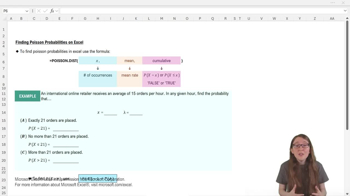
What is the purpose of the =POISSON.DIST function in Excel?
It is used to calculate Poisson probabilities for a given number of occurrences and mean rate.
What are the three arguments required by the =POISSON.DIST function?
The three arguments are x (number of occurrences), mean (lambda), and cumulative (TRUE or FALSE).
What does setting the cumulative argument to FALSE in =POISSON.DIST do?
It finds the probability that x is exactly equal to a specific value.
What does setting the cumulative argument to TRUE in =POISSON.DIST do?
It calculates the probability that x is less than or equal to a specific value.
How do you find the probability that x is greater than a value using =POISSON.DIST?
Use the complement rule: 1 minus the cumulative probability (1 − P(X ≤ x)).
In the example, what is the mean rate (lambda) for the online retailer?
The mean rate (lambda) is 15 orders per hour.
How would you write the Excel formula to find the probability that exactly 21 orders are placed?
Use =POISSON.DIST(21, 15, FALSE).
How would you write the Excel formula to find the probability that no more than 21 orders are placed?
Use =POISSON.DIST(21, 15, TRUE).
Why is the order of arguments important in =POISSON.DIST?
Because Excel expects the arguments in a specific order: x, mean, cumulative.
What is the approximate probability that exactly 21 orders are placed when lambda is 15?
It is approximately 0.03, or 3%.
What is the approximate probability that no more than 21 orders are placed when lambda is 15?
It is approximately 0.95, or 95%.
What is the approximate probability that more than 21 orders are placed when lambda is 15?
It is approximately 0.05, or 5%.
How do you use Excel to subtract one cell's value from 1?
Type =1 minus the cell reference, such as =1-E18.
Why do the probabilities P(X ≤ 21) and P(X > 21) add up to 1?
Because they are complements, representing all possible outcomes.
What should you always include at the start of an Excel formula?
You should always start with an equal sign (=) to indicate a calculation.
 BackBack
 07:42
07:42