Back

Regression Line Equation and Coefficient of Determination - Excel quiz

Control buttons has been changed to "navigation" mode.
1/15
  • What is the first step to finding the regression line equation and R-squared in Excel?

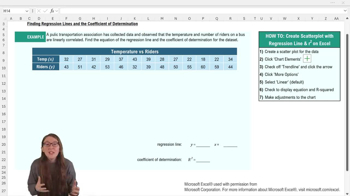
    The first step is to create a scatterplot of your data in Excel.
  • How do you add a trend line to a scatterplot in Excel?

    You add a trend line by selecting the chart, going to the chart elements menu, and checking off the 'Trendline' option.
  • What should you do after adding a trend line to display the regression equation and R-squared value?

    You should select 'More Options' for the trend line, then check 'Display Equation on chart' and 'Display R squared value on chart.'
  • What does the regression line equation in Excel typically look like?

    It is usually in the form y = mx + b, where m is the slope and b is the y-intercept.
  • What does the coefficient of determination (R-squared) represent?

    R-squared represents the proportion of variation in the response variable explained by the explanatory variable.
  • If R-squared is 0.87, what does this mean in context?

    It means that 87% of the variation in the y variable can be explained by the variation in the x variable.
  • Why might you want to move the regression equation and R-squared value on your Excel chart?

    You might move them to make them easier to read and not cover any data points.
  • Why is it important to label your axes and chart title in Excel?

    Proper labeling makes the graph easy to interpret and ensures clarity about what the data represents.
  • What should you do if the regression equation or R-squared value is hard to read on the chart?

    You can write them somewhere else on your worksheet or adjust the font size for better readability.
  • What is the default type of trend line Excel uses when you add one to a scatterplot?

    The default trend line type is linear.
  • How can you round the regression equation values in Excel for easier use?

    You can manually round the slope and intercept values, following your professor's rounding policy.
  • What is the purpose of the regression line in predictive analytics?

    The regression line predicts values of the response variable based on the explanatory variable.
  • What Excel menu do you use to add chart elements like a trend line?

    You use the 'Chart Design' menu and select 'Add Chart Element.'
  • What does the y-intercept represent in the regression line equation?

    The y-intercept is the predicted value of y when x equals zero.
  • Why is it useful to visualize data with a scatterplot before adding a regression line?

    A scatterplot helps you see the relationship between variables and assess if a linear model is appropriate.