A stemplot contains the row 2|0024555789. List the data points displayed in this row.
Table of contents
- 1. Intro to Stats and Collecting Data1h 14m
- 2. Describing Data with Tables and Graphs1h 56m
- 3. Describing Data Numerically2h 5m
- 4. Probability2h 17m
- 5. Binomial Distribution & Discrete Random Variables3h 6m
- 6. Normal Distribution and Continuous Random Variables2h 11m
- 7. Sampling Distributions & Confidence Intervals: Mean3h 23m
- Sampling Distribution of the Sample Mean and Central Limit Theorem19m
- Distribution of Sample Mean - ExcelBonus23m
- Introduction to Confidence Intervals15m
- Confidence Intervals for Population Mean1h 18m
- Determining the Minimum Sample Size Required12m
- Finding Probabilities and T Critical Values - ExcelBonus28m
- Confidence Intervals for Population Means - ExcelBonus25m
- 8. Sampling Distributions & Confidence Intervals: Proportion2h 10m
- 9. Hypothesis Testing for One Sample5h 8m
- Steps in Hypothesis Testing1h 6m
- Performing Hypothesis Tests: Means1h 4m
- Hypothesis Testing: Means - ExcelBonus42m
- Performing Hypothesis Tests: Proportions37m
- Hypothesis Testing: Proportions - ExcelBonus27m
- Performing Hypothesis Tests: Variance12m
- Critical Values and Rejection Regions28m
- Link Between Confidence Intervals and Hypothesis Testing12m
- Type I & Type II Errors16m
- 10. Hypothesis Testing for Two Samples5h 37m
- Two Proportions1h 13m
- Two Proportions Hypothesis Test - ExcelBonus28m
- Two Means - Unknown, Unequal Variance1h 3m
- Two Means - Unknown Variances Hypothesis Test - ExcelBonus12m
- Two Means - Unknown, Equal Variance15m
- Two Means - Unknown, Equal Variances Hypothesis Test - ExcelBonus9m
- Two Means - Known Variance12m
- Two Means - Sigma Known Hypothesis Test - ExcelBonus21m
- Two Means - Matched Pairs (Dependent Samples)42m
- Matched Pairs Hypothesis Test - ExcelBonus12m
- Two Variances and F Distribution29m
- Two Variances - Graphing CalculatorBonus16m
- 11. Correlation1h 24m
- 12. Regression3h 33m
- Linear Regression & Least Squares Method26m
- Residuals12m
- Coefficient of Determination12m
- Regression Line Equation and Coefficient of Determination - ExcelBonus8m
- Finding Residuals and Creating Residual Plots - ExcelBonus11m
- Inferences for Slope31m
- Enabling Data Analysis ToolpakBonus1m
- Regression Readout of the Data Analysis Toolpak - ExcelBonus21m
- Prediction Intervals13m
- Prediction Intervals - ExcelBonus19m
- Multiple Regression - ExcelBonus29m
- Quadratic Regression15m
- Quadratic Regression - ExcelBonus10m
- 13. Chi-Square Tests & Goodness of Fit2h 21m
- 14. ANOVA2h 29m
2. Describing Data with Tables and Graphs
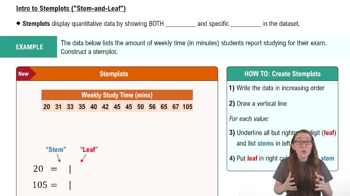
Stemplots (Stem-and-Leaf Plots)
Problem 2.2.18
Textbook Question
Graphing Data Sets In Exercises 17–32, organize the data using the indicated type of graph. Describe any patterns.
Nursing Use a stem-and-leaf plot to display the data, which represent the number of hours 24 nurses work per week.
40 40 35 48 38 40 36 50 32 36 40 35
30 24 40 36 40 36 40 39 33 40 32 38
Verified step by step guidance1
Step 1: Understand the problem. The task is to create a stem-and-leaf plot for the given data set, which represents the number of hours 24 nurses work per week. A stem-and-leaf plot organizes data by separating each value into a 'stem' (all but the last digit) and a 'leaf' (the last digit).
Step 2: Organize the data in ascending order. Arrange the data set in increasing order to make it easier to construct the stem-and-leaf plot. The ordered data set is: 24, 30, 32, 32, 33, 35, 35, 36, 36, 36, 36, 38, 38, 39, 40, 40, 40, 40, 40, 40, 40, 40, 48, 50.
Step 3: Identify the stems and leaves. The 'stem' will be the tens digit of each number, and the 'leaf' will be the ones digit. For example, for the number 24, the stem is 2, and the leaf is 4. For the number 36, the stem is 3, and the leaf is 6.
Step 4: Construct the stem-and-leaf plot. Create a vertical list of stems (2, 3, 4, 5) and write the corresponding leaves next to each stem. For example, under the stem '3', write the leaves 0, 2, 2, 3, 5, 5, 6, 6, 6, 6, 8, 8, 9. Repeat this process for all stems.
Step 5: Analyze the plot for patterns. Look for clusters, gaps, or any other patterns in the data. For example, you might notice that the majority of the data is concentrated around the stem '4', indicating that most nurses work around 40 hours per week.
Verified video answer for a similar problem:This video solution was recommended by our tutors as helpful for the problem above
Video duration:
2mPlay a video:
0 Comments
Key Concepts
Here are the essential concepts you must grasp in order to answer the question correctly.
Stem-and-Leaf Plot
A stem-and-leaf plot is a method of displaying quantitative data in a graphical format, similar to a histogram, that helps to visualize the distribution of the data. Each number is split into a 'stem' (the leading digit or digits) and a 'leaf' (the trailing digit). This format retains the original data values while allowing for easy identification of patterns, such as clusters or gaps in the data.
Recommended video:
Creating Stemplots
Data Organization
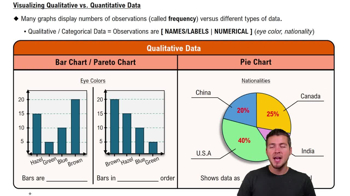
Data organization refers to the systematic arrangement of data to facilitate analysis and interpretation. In the context of graphing, it involves categorizing and structuring data points in a way that highlights trends and relationships. Effective organization is crucial for accurately representing the data and drawing meaningful conclusions from visualizations.
Recommended video:
Guided course
Visualizing Qualitative vs. Quantitative Data
Identifying Patterns
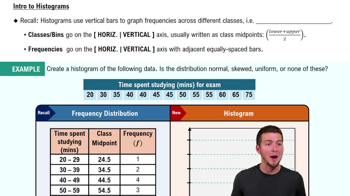
Identifying patterns in data involves analyzing the visual representation to discern trends, clusters, or anomalies. Patterns can indicate relationships between variables or highlight significant observations, such as common values or ranges. Recognizing these patterns is essential for making informed decisions based on the data and for communicating findings effectively.
Recommended video:
Guided course
Intro to Histograms
Related Videos
Related Practice
Multiple Choice
413
views
10
rank
