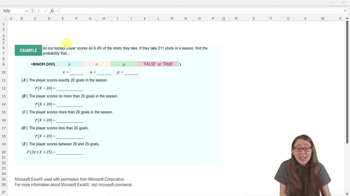
What is the purpose of Excel's BINOM.DIST function?
BINOM.DIST calculates binomial probabilities by inputting the number of successes, trials, and probability of success. It can compute exact or cumulative probabilities depending on the fourth argument.
What are the four arguments required by the BINOM.DIST function in Excel?
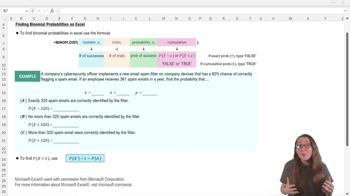
The four arguments are: number of successes (x), number of trials (n), probability of success (p), and cumulative (true or false).
How do you specify an exact probability in BINOM.DIST?
Set the fourth argument, cumulative, to false to calculate the probability that x equals a specific value.
How do you specify a cumulative probability in BINOM.DIST?
Set the fourth argument, cumulative, to true to calculate the probability that x is less than or equal to a specific value.
What does the cumulative argument in BINOM.DIST control?
It determines whether the function returns the probability for exactly x successes (false) or for x or fewer successes (true).
How do you convert a percentage probability to a decimal for BINOM.DIST?
Divide the percentage by 100; for example, 92% becomes 0.92.
What is the formula for finding the probability that x is greater than a value using BINOM.DIST?
Use the complement rule: 1 minus the probability that x is less than or equal to the value, or 1−P(X≤x).
If you want to find the probability that more than 320 successes occur, which BINOM.DIST setup do you use?
First calculate P(X≤320) with cumulative true, then subtract that value from 1 to get P(X>320).
What is the probability that exactly 320 successes occur if n=361 and p=0.92?
Use BINOM.DIST(320, 361, 0.92, false) in Excel, which yields approximately 0.006.
How do you check if your complement probabilities are correct in Excel?
Add the probabilities for complementary events; they should sum to 1.
What is the probability that no more than 320 successes occur if n=361 and p=0.92?
Use BINOM.DIST(320, 361, 0.92, true) in Excel, which yields approximately 0.015.
How can you quickly reuse a BINOM.DIST formula for similar problems in Excel?
Copy the cell containing the formula and adjust only the necessary argument(s), such as cumulative.
What does the equals sign (=) do when entering a formula in Excel?
It tells Excel to perform a calculation using the formula entered.
Why is it important to identify x, n, and p before using BINOM.DIST?
These values are required as arguments for the function and ensure accurate probability calculations.
What is the result of 1−P(X≤320) if P(X≤320) is 0.015?
The result is 0.985, representing the probability that more than 320 successes occur.
 Back
Back
 08:48
08:48