Skip to main content
Statistics
My Course
Learn
Exam Prep
AI Tutor
Study Guides
Textbook Solutions
Flashcards
Explore
Try the app
My Course
Learn
Exam Prep
AI Tutor
Study Guides
Textbook Solutions
Flashcards
Explore
Try the app
Back
Finding Probabilities and T Critical Values - Excel quiz
You can tap to flip the card.
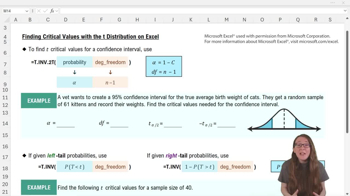
Which Excel function is used to find t critical values for a two-tail probability?
You can tap to flip the card.
👆
Which Excel function is used to find t critical values for a two-tail probability?
The function =T.INV.2T is used to find t critical values for a two-tail probability.
Track progress
Control buttons has been changed to "navigation" mode.
1/15
Related flashcards
Related practice
Recommended videos
Finding Probabilities and T Critical Values - Excel definitions
Finding Probabilities and T Critical Values - Excel
15 Terms
7. Sampling Distributions & Confidence Intervals: Mean
2 topics
6 problems
Chapter
Ally
04:12
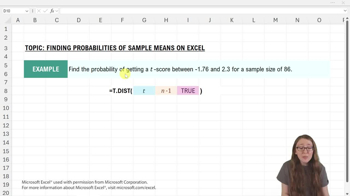
Finding Probabilities From t-Scores Example 1
110
views
2
rank
08:35
Finding t Critical Values From Probabilities - Excel
272
views
2
rank
1
comments
07:54
Finding Probabilities From t-Scores
135
views
2
rank
Terms in this set (15)
Hide definitions
Which Excel function is used to find t critical values for a two-tail probability?
The function =T.INV.2T is used to find t critical values for a two-tail probability.
How do you calculate degrees of freedom for the t distribution in Excel?
Degrees of freedom are calculated as n (sample size) minus 1.
What does the 'alpha' input represent in the =T.INV.2T function?
Alpha represents the combined probability in both tails, calculated as 1 minus the confidence level.
How do you find the negative t critical value in Excel after using =T.INV.2T?
You can place a negative sign in front of the positive critical value or use Excel to multiply it by -1.
Which Excel function is used to find a t score for a left tail probability?
The function =T.INV is used to find a t score for a left tail probability.
How do you convert a right tail probability to a left tail probability for use in =T.INV?
You use the complement rule: left tail probability = 1 minus the right tail probability.
What are the two inputs required for the =T.INV function?
The two inputs are the left tail probability and the degrees of freedom.
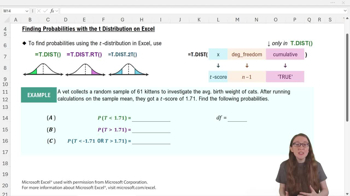
Which Excel function is used to find the probability of getting a t score below a certain value?
The function =T.DIST is used to find the left tail probability for a t score.
What are the three inputs for the =T.DIST function in Excel?
The inputs are the t score, degrees of freedom, and 'TRUE' for cumulative probability.
Which Excel function is used to find the probability of getting a t score above a certain value?
The function =T.DIST.RT is used to find the right tail probability for a t score.
How many inputs does the =T.DIST.RT function require?
It requires two inputs: the t score and the degrees of freedom.
Which Excel function is used to find the probability of getting a t score in either tail (two-tail probability)?
The function =T.DIST.2T is used to find two-tail probabilities.
When using =T.DIST.2T, which t score should you input if you have both a negative and positive value?
You should input the positive t score; entering the negative value will cause an error.
What happens if you try to enter a third argument (TRUE) in =T.DIST.RT or =T.DIST.2T?
You will get an error because these functions only accept two inputs: t score and degrees of freedom.
Why is using Excel advantageous for finding t critical values compared to tables?
Excel allows you to find t critical values for any confidence level and sample size, which is not possible with tables.
 BackBack
 04:12
04:12