Table of contents
- 1. Introduction to Statistics53m
- 2. Describing Data with Tables and Graphs2h 2m
- 3. Describing Data Numerically2h 8m
- 4. Probability2h 26m
- 5. Binomial Distribution & Discrete Random Variables3h 28m
- 6. Normal Distribution & Continuous Random Variables2h 21m
- 7. Sampling Distributions & Confidence Intervals: Mean3h 37m
- Sampling Distribution of the Sample Mean and Central Limit Theorem19m
- Distribution of Sample Mean - ExcelBonus23m
- Introduction to Confidence Intervals22m
- Confidence Intervals for Population Mean1h 26m
- Determining the Minimum Sample Size Required12m
- Finding Probabilities and T Critical Values - ExcelBonus28m
- Confidence Intervals for Population Means - ExcelBonus25m
- 8. Sampling Distributions & Confidence Intervals: Proportion2h 20m
- 9. Hypothesis Testing for One Sample5h 15m
- Steps in Hypothesis Testing1h 13m
- Performing Hypothesis Tests: Means1h 1m
- Hypothesis Testing: Means - ExcelBonus42m
- Performing Hypothesis Tests: Proportions39m
- Hypothesis Testing: Proportions - ExcelBonus27m
- Performing Hypothesis Tests: Variance12m
- Critical Values and Rejection Regions29m
- Link Between Confidence Intervals and Hypothesis Testing12m
- Type I & Type II Errors16m
- 10. Hypothesis Testing for Two Samples5h 35m
- Two Proportions1h 12m
- Two Proportions Hypothesis Test - ExcelBonus28m
- Two Means - Unknown, Unequal Variance1h 2m
- Two Means - Unknown Variances Hypothesis Test - ExcelBonus12m
- Two Means - Unknown, Equal Variance15m
- Two Means - Unknown, Equal Variances Hypothesis Test - ExcelBonus9m
- Two Means - Known Variance12m
- Two Means - Sigma Known Hypothesis Test - ExcelBonus21m
- Two Means - Matched Pairs (Dependent Samples)42m
- Matched Pairs Hypothesis Test - ExcelBonus12m
- Two Variances and F Distribution29m
- Two Variances - Graphing CalculatorBonus15m
- 11. Correlation1h 24m
- 12. Regression3h 42m
- Linear Regression & Least Squares Method26m
- Residuals12m
- Coefficient of Determination12m
- Regression Line Equation and Coefficient of Determination - ExcelBonus8m
- Finding Residuals and Creating Residual Plots - ExcelBonus11m
- Inferences for Slope32m
- Enabling Data Analysis ToolpakBonus1m
- Regression Readout of the Data Analysis Toolpak - ExcelBonus21m
- Prediction Intervals13m
- Prediction Intervals - ExcelBonus19m
- Multiple Regression - ExcelBonus29m
- Quadratic Regression23m
- Quadratic Regression - ExcelBonus10m
- 13. Chi-Square Tests & Goodness of Fit2h 31m
- 14. ANOVA2h 32m
12. Regression
Residuals
Multiple Choice
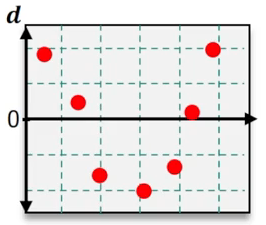
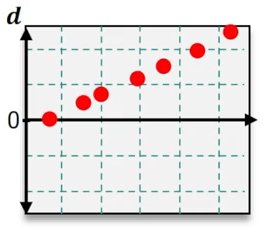
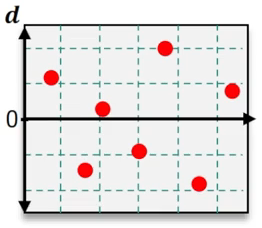
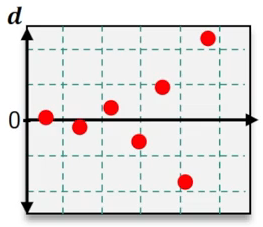
Which of the following residual plots suggest that a linear regression model is appropriate?
A
B
C
D
0 Comments
Verified step by step guidance1
Step 1: Understand the purpose of residual plots in regression analysis. Residual plots are used to assess whether the assumptions of a linear regression model are valid. Specifically, they help determine if the residuals (errors) are randomly distributed and if the relationship between the independent and dependent variables is linear.
Step 2: Examine the residual plots provided. A residual plot that suggests a linear regression model is appropriate will show residuals scattered randomly around the horizontal axis (y = 0) without any discernible pattern.
Step 3: Identify patterns in the residual plots. For example, if the residuals form a curve, trend, or systematic pattern, this indicates that a linear model may not be appropriate. If the residuals are randomly distributed, this supports the use of a linear model.
Step 4: Compare the residual plots. In the images provided, look for the plot where the residuals are evenly scattered around the horizontal axis without forming a trend or systematic pattern.
Step 5: Conclude which residual plot suggests a linear regression model is appropriate based on the analysis. The correct plot will show no curvature, trend, or clustering of residuals, indicating that the linear regression assumptions are satisfied.