Skip to main content
Statistics for Business
My Course
Learn
Exam Prep
AI Tutor
Study Guides
Flashcards
Explore
Try the app
My Course
Learn
Exam Prep
AI Tutor
Study Guides
Flashcards
Explore
Try the app
Back
Descriptive Statistics-Excel quiz
You can tap to flip the card.
What Excel function is used to calculate the median of a dataset?
You can tap to flip the card.
👆
What Excel function is used to calculate the median of a dataset?
The function =MEDIAN() is used to calculate the median in Excel.
Track progress
Control buttons has been changed to "navigation" mode.
1/15
Related flashcards
Related practice
Recommended videos
Descriptive Statistics-Excel definitions
Descriptive Statistics-Excel
15 Terms
3. Describing Data Numerically
8 topics
15 problems
Chapter
Jonathan
Guided course
06:10
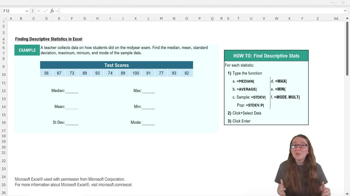
Descriptive Statistics-Excel
189
views
2
rank
Guided course
05:30
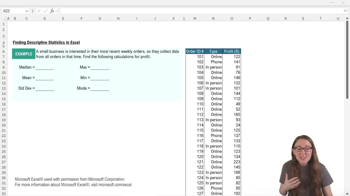
Descriptive Statistics-Excel Example 1
121
views
5
rank
Terms in this set (15)
Hide definitions
What Excel function is used to calculate the median of a dataset?
The function =MEDIAN() is used to calculate the median in Excel.
How do you indicate to Excel that you want to perform a calculation using a function?
You start the formula with an equal sign (=) followed by the function name and an open parenthesis.
What is the Excel function for finding the mean (average) of a dataset?
The function =AVERAGE() is used to find the mean in Excel.
Which Excel function calculates the standard deviation for a sample?
The function =STDEV() calculates the sample standard deviation in Excel.
How do you modify the standard deviation function in Excel to calculate for a population instead of a sample?
You use =STDEV.P() to calculate the population standard deviation in Excel.
What function would you use in Excel to find the maximum value in a dataset?
You use =MAX() to find the maximum value in a dataset.
How can you select a range of data for a function in Excel?
You can either click and drag to highlight the cells or type the cell range directly into the function.
What is the Excel function for finding the minimum value in a dataset?
The function =MIN() is used to find the minimum value in Excel.
Which Excel function should you use to find all modes in a dataset?
You should use =MODE.MULT() to find all modes in a dataset.
Why might the =MODE.MULT() function return more than one value?
It returns multiple values if the dataset has more than one mode.
What is the general format for any Excel function?
The format is =FUNCTION_NAME(arguments), where arguments are the data or cell references.
If you want to check Excel’s calculation for descriptive statistics, what can you do?
You can calculate the statistics by hand and compare them to Excel’s results.
What does the colon (:) signify when typing a range in an Excel function?
The colon indicates a range of cells from the first to the last specified cell.
What is the result of using =STDEV() on sample data in Excel?
It returns the sample standard deviation of the selected data.
Why is it important to know whether your data is a sample or a population when using Excel’s standard deviation functions?
Because Excel uses different formulas for sample (=STDEV()) and population (=STDEV.P()) standard deviation, affecting the result.
 BackBack
 06:10
06:10