Skip to main content
Statistics for Business
My Course
Learn
Exam Prep
AI Tutor
Study Guides
Flashcards
Explore
Try the app
My Course
Learn
Exam Prep
AI Tutor
Study Guides
Flashcards
Explore
Try the app
Back
Finding Binomial Probabilities-Excel definitions
You can tap to flip the card.
Binomial Probability
You can tap to flip the card.
👆
Binomial Probability
Chance of a specific number of successes in a fixed number of independent trials, each with the same likelihood of success.
Track progress
Control buttons has been changed to "navigation" mode.
1/14
Related flashcards
Related practice
Recommended videos
Finding Binomial Probabilities-Excel quiz
Finding Binomial Probabilities-Excel
15 Terms
Poisson Distribution
5. Binomial Distribution & Discrete Random Variables
4 problems
Topic
Ernest
5. Binomial Distribution & Discrete Random Variables
3 topics
15 problems
Chapter
Ernest
Guided course
08:48
Finding Binomial Probabilities Example 1
110
views
5
rank
Guided course
08:48
Finding Binomial Probabilities
172
views
5
rank
Terms in this set (14)
Hide definitions
Binomial Probability
Chance of a specific number of successes in a fixed number of independent trials, each with the same likelihood of success.
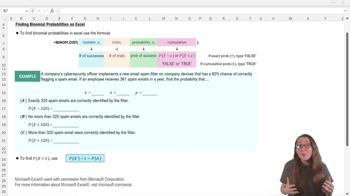
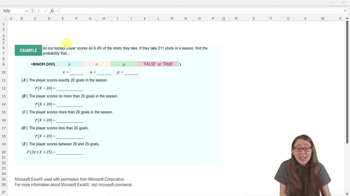
BINOM.DIST Function
Excel tool that calculates either exact or cumulative binomial probabilities using four required arguments.
Number of Successes
Desired count of positive outcomes in a binomial experiment, often represented as x in calculations.
Number of Trials
Total attempts or observations in a binomial setting, typically denoted as n.
Probability of Success
Likelihood that a single trial results in a positive outcome, expressed as a decimal value.
Exact Probability
Chance that the number of successes equals a specific value, found by setting the cumulative argument to FALSE.
Cumulative Probability
Chance that the number of successes is less than or equal to a value, calculated by setting the cumulative argument to TRUE.
Complement Rule
Method for finding the probability of an event by subtracting the probability of its opposite from one.
Arguments
Inputs required by a function, such as number of successes, trials, probability, and cumulative indicator in Excel.
Formula Bar
Excel workspace area where functions and calculations are entered or edited.
Decimal Equivalent
Numeric representation of a percentage as a value between 0 and 1, used for probability calculations.
Cell Reference
Excel notation that points to a specific location in a worksheet, allowing dynamic use of values in calculations.
Sanity Check
Quick verification step to ensure calculated probabilities make logical sense, such as confirming complements sum to one.
Cumulative Indicator
Fourth argument in BINOM.DIST that specifies whether to compute exact or cumulative probability.
 BackBack
 08:48
08:48