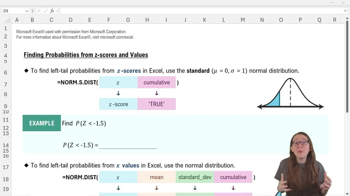
What Excel function is used to find the cumulative probability for a given z-score in the standard normal distribution?
The function is =NORM.S.DIST(z, TRUE), where z is the z-score and TRUE specifies cumulative probability.
What does the 'cumulative' argument in NORM.S.DIST and NORM.DIST functions specify when set to TRUE?
It tells Excel to return the cumulative left-tail probability, i.e., the probability of getting a value less than or equal to the input.
How do you use Excel to find the probability that a z-score is less than -1.5?
Use =NORM.S.DIST(-1.5, TRUE), which returns approximately 0.07, or a 7% chance.
Which Excel function should you use to find the probability for a non-standard normal distribution given an x value, mean, and standard deviation?
Use =NORM.DIST(x, mean, standard_dev, TRUE) to find the cumulative probability.
If the mean baking time is 11 minutes and the standard deviation is 0.76, how do you find the probability that a batch takes 10 or fewer minutes?
Use =NORM.DIST(10, 11, 0.76, TRUE), which gives about a 9% chance.
How do you find the probability that a value is greater than a certain x in Excel using the normal distribution functions?
Calculate 1 minus the left-tail probability: 1 - NORM.DIST(x, mean, standard_dev, TRUE).
What is the complement rule in probability, and how is it applied in Excel?
The complement rule states that P(A) = 1 - P(not A); in Excel, use it to find right-tail probabilities by subtracting the left-tail probability from 1.
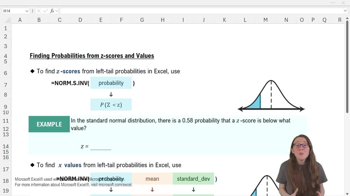
Which Excel function converts a left-tail probability into a z-score in the standard normal distribution?
Use =NORM.S.INV(probability), where 'probability' is the left-tail probability.
If you are given a right-tail probability, how do you use NORM.S.INV to find the corresponding z-score?
First, convert the right-tail probability to a left-tail probability by subtracting it from 1, then use NORM.S.INV with that value.
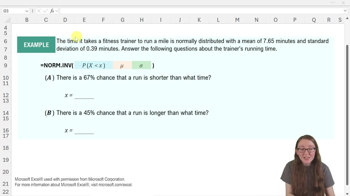
What Excel function is used to find the x value corresponding to a given cumulative probability in a normal distribution with any mean and standard deviation?
Use =NORM.INV(probability, mean, standard_dev), where 'probability' is the left-tail probability.
How do you find the x value below which 33% of song lengths fall, given a mean of 3.56 and standard deviation of 0.32?
Use =NORM.INV(0.33, 3.56, 0.32), which returns approximately 3.419.
If there is a 0.2 chance that a song is longer than a certain length, how do you find that length using Excel?
Use =NORM.INV(1-0.2, mean, standard_dev) to convert the right-tail probability to a left-tail probability before using the function.
What does the NORM.DIST function return when used with the 'TRUE' argument?
It returns the cumulative probability that a value from the normal distribution is less than or equal to the specified x.
Why must probabilities entered into NORM.S.INV and NORM.INV be left-tail probabilities?
Because these functions return the value below which the specified proportion of the distribution falls, which is defined by the left-tail probability.
How does Excel facilitate the application of the 68–95–99.7 Rule using its normal distribution functions?
Excel's functions allow you to quickly find probabilities and values corresponding to standard deviations from the mean, making it easy to apply the empirical rule.
 Back
Back
 08:09
08:09