Skip to main content
Statistics for Business
My Course
Learn
Exam Prep
AI Tutor
Study Guides
Flashcards
Explore
Try the app
My Course
Learn
Exam Prep
AI Tutor
Study Guides
Flashcards
Explore
Try the app
Back
Two-Way ANOVA - Excel definitions
You can tap to flip the card.
Two-Way ANOVA
You can tap to flip the card.
👆
Two-Way ANOVA
Statistical method analyzing the influence of two factors and their interaction on group means within a dataset.
Track progress
Control buttons has been changed to "navigation" mode.
1/15
Related flashcards
Related practice
Recommended videos
Two-Way ANOVA - Excel quiz
Two-Way ANOVA - Excel
15 Terms
14. ANOVA
1 topic
15 problems
Chapter
Ally
Guided course
08:34
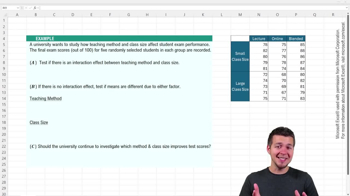
Two-Way ANOVA Using Excel
42
views
Guided course
09:46
Two-Way ANOVA Using Excel Example 1
45
views
Terms in this set (15)
Hide definitions
Two-Way ANOVA
Statistical method analyzing the influence of two factors and their interaction on group means within a dataset.
Interaction Effect
Combined influence of two factors where their joint impact on means differs from their individual effects.
Factor
Categorical variable representing a condition or grouping, such as advertising medium or discount level.
Level
Specific category within a factor, like social media, TV, or email for advertising medium.
Null Hypothesis
Default assumption stating no effect or difference exists, such as no interaction or no mean difference.
P-Value
Probability measure used to decide whether to reject the null hypothesis at a chosen significance level.
Alpha Level
Threshold probability, often set at 0.05, determining the cutoff for statistical significance.
Replication
Use of multiple observations for each group combination, increasing reliability of ANOVA results.
Source of Variation
Component in ANOVA output identifying where differences in means may originate, such as factors or interaction.
F Statistic
Ratio comparing variance between groups to variance within groups, used to assess significance in ANOVA.
Data Analysis Toolpak
Excel add-in providing automated statistical calculations, including ANOVA summary tables.
Means
Average values for each group or combination, compared to detect differences across factors.
One-Way ANOVA
Statistical test comparing means across groups for a single factor, used when no interaction is present.
Summary Table
Excel output displaying statistics like sums, averages, variances, and ANOVA results for interpretation.
Hypothesis Test
Procedure for evaluating assumptions about population parameters using sample data and statistical evidence.
 BackBack
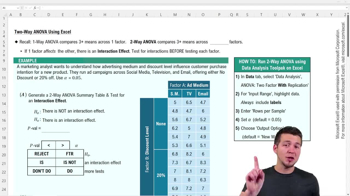
 08:34
08:34