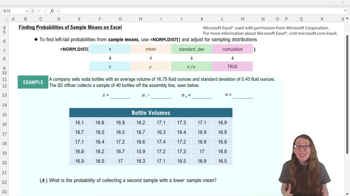
What Excel function is used to find left tail probabilities for sample means?
The =NORM.DIST function is used to find left tail probabilities for sample means in Excel.
What value should you use for the first input (x) in the =NORM.DIST function when working with sample means?
You should use x̄, the sample mean you want to find the probability for, as the first input.
What does the second input (mean) in =NORM.DIST represent for sampling distributions?
The second input is the population mean, μ, which is also the mean of the sampling distribution.
How do you calculate the standard deviation of the sampling distribution for use in =NORM.DIST?
Divide the population standard deviation (σ) by the square root of the sample size (n).
What should the 'cumulative' input be set to in =NORM.DIST to find a left tail probability?
Set the cumulative input to TRUE to find a left tail probability.
How do you find the probability of a sample mean being above a certain value using Excel?
Calculate 1 minus the left tail probability using =1 - NORM.DIST(..., TRUE) to get the right tail probability.
Which Excel function is used to calculate the mean of a sample data set?
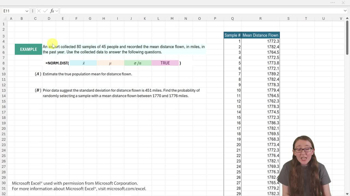
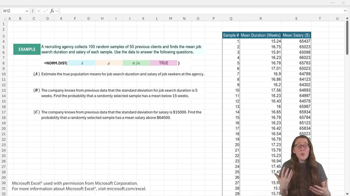
Use =AVERAGE(range) to calculate the sample mean in Excel.
What is the minimum sample size for the sampling distribution of the mean to be approximately normal?
A sample size of at least 30 is generally considered sufficient for the sampling distribution to be normal.
If you are given raw sample data, what must you calculate before using =NORM.DIST?
You must calculate the sample mean (x̄) from the data.
How do you interpret the result of =NORM.DIST for a sample mean?
The result gives the probability of obtaining a sample mean less than or equal to the specified value.
What does the Central Limit Theorem allow us to do with sample means?
It allows us to use the normal distribution to make inferences about sample means, even if the population is not normal, provided the sample size is large enough.
How do you find the standard deviation of the sampling distribution in Excel if σ = 0.43 and n = 40?
Type =0.43/SQRT(40) in Excel to get the standard deviation of the sampling distribution.
What is the probability of collecting a second sample with a mean lower than 16.755 if the left tail probability is 0.68?
There is a 68% chance of collecting a second sample with a mean lower than 16.755.
If the left tail probability for a sample mean is 0.68, what is the right tail probability?
The right tail probability is 1 - 0.68 = 0.32, or 32%.
Why might you need to use =AVERAGE in Excel before using =NORM.DIST for a sample mean problem?
You use =AVERAGE to calculate the sample mean (x̄) from the data, which is needed as an input for =NORM.DIST.
 Back
Back

 08:08
08:08