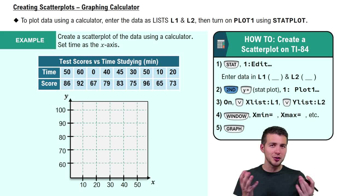
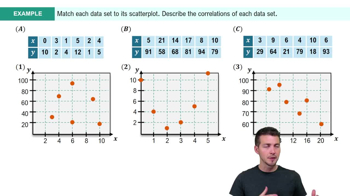
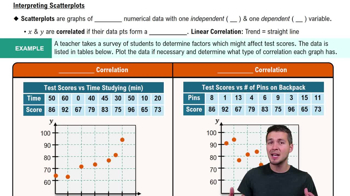
A scatterplot is used to visualize paired numerical data, showing the relationship between two variables, one independent (x-axis) and one dependent (y-axis).
How do you plot points on a scatterplot?
You plot points by pairing each x value with its corresponding y value and marking the coordinate (x, y) on the grid.
What does a positive correlation look like on a scatterplot?
A positive correlation appears as data points trending upward, where y values increase as x values increase.
What does a negative correlation look like on a scatterplot?
A negative correlation appears as data points trending downward, where y values decrease as x values increase.
What is a linear correlation?
A linear correlation is when the data points form a trend that can be approximated by a straight line.
What is a nonlinear relationship in a scatterplot?
A nonlinear relationship is when the data points form a curve or shape that is not a straight line, such as a parabola.
What does 'no correlation' mean in a scatterplot?
No correlation means there is no discernible relationship or pattern between the x and y values in the data.
Does correlation imply causation?
No, correlation does not imply causation; just because two variables are related does not mean one causes the other.
What is the independent variable in a scatterplot?
The independent variable is plotted on the x-axis and is the variable you control or categorize.
What is the dependent variable in a scatterplot?
The dependent variable is plotted on the y-axis and is the variable that responds to changes in the independent variable.
Why is it important to pair x and y values correctly when entering data into a graphing calculator?
Pairing x and y values correctly ensures each data point represents the intended relationship and the scatterplot is accurate.
Which columns should you use for x and y data in a TI-84 calculator?
You should use L1 for x data and L2 for y data, as these are the calculator's default settings for scatterplots.
What should you do if your scatterplot does not appear on the calculator screen?
Adjust the window settings (x min, x max, y min, y max) to match the range of your data so the points are visible.
How can you improve the appearance of your scatterplot on a calculator?
Enable grid lines and labels in the formatting menu to make the scatterplot clearer and easier to interpret.
What is the purpose of adjusting the x scale and y scale in the calculator window settings?
Adjusting the scales controls the spacing of tick marks, making the graph easier to read and interpret.
 Back
Back


 06:36
06:36